Internet Explorer 6 and, curiously enough, Google’s Chrome browser, don’t display RSS or Atom feeds in a particularly helpful manner. IE6 displays neatly-formatted XML, with color-coding and indentation, whereas Chrome displays the text node of all the XML tags without so much as a linebreak:
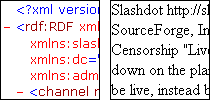
Either way is completely intimidating to an RSS novice. Fortunately, we can change that.
Both IE6 and Chrome will apply an XSL stylesheet, if one is specified. To specify a stylesheet, insert the following code right after the DTD:
<?xml-stylesheet href="rss2.xsl" type="text/xsl" media="screen"?>
I created a bare-bones XSL file to transform RSS 2.0 files:
rss2.xsl
Voila! The RSS feed now displays some information telling the user what RSS is and how to use it.
Of course, Firefox, Internet Explorer 7, and other modern browsers give the user some pretty click options that allow them to add the feed to their RSS reader of choice with the click of a button. There’s really no reason we couldn’t add code to achieve the same effect to our XSL file. For example, just view the generated source (using a tool like the Web Developer Toolbar) of an RSS feed displayed in Firefox and copy or further customize the code.
(I’m sure I’ll get to that in my copious free time.)
This brings up a good question in my mind, though: why do the modern browsers override publisher-specified XSL stylesheets? I’ll admit that it adds a certain helpful consistency to all RSS feeds, but it seems peculiar. I suppose that since so few RSS feeds have custom XSL stylesheets, it is better to apply a single style to all. It’s an idea that is bad in theory, but good in practice.
(And you can always change your Firefox settings to customize how it handles Web Feeds. I thought I could trick it into displaying my styled feed, but I recommend against using Firefox to open web feeds with Firefox: I started an infinite loop.)
Instead of creating your own XSL, you could also use Feedburner’s as a starting point:
http://feeds.feedburner.com/~d/styles/rss2full.xsl
Is there no way of stopping ‘modern’ browsers using their own styling? Feedburner seem to have managed to get around it?
FeedBurner is crippleware for lazy people who allow themselves to let Google display their advertising in somebody else’s feed.